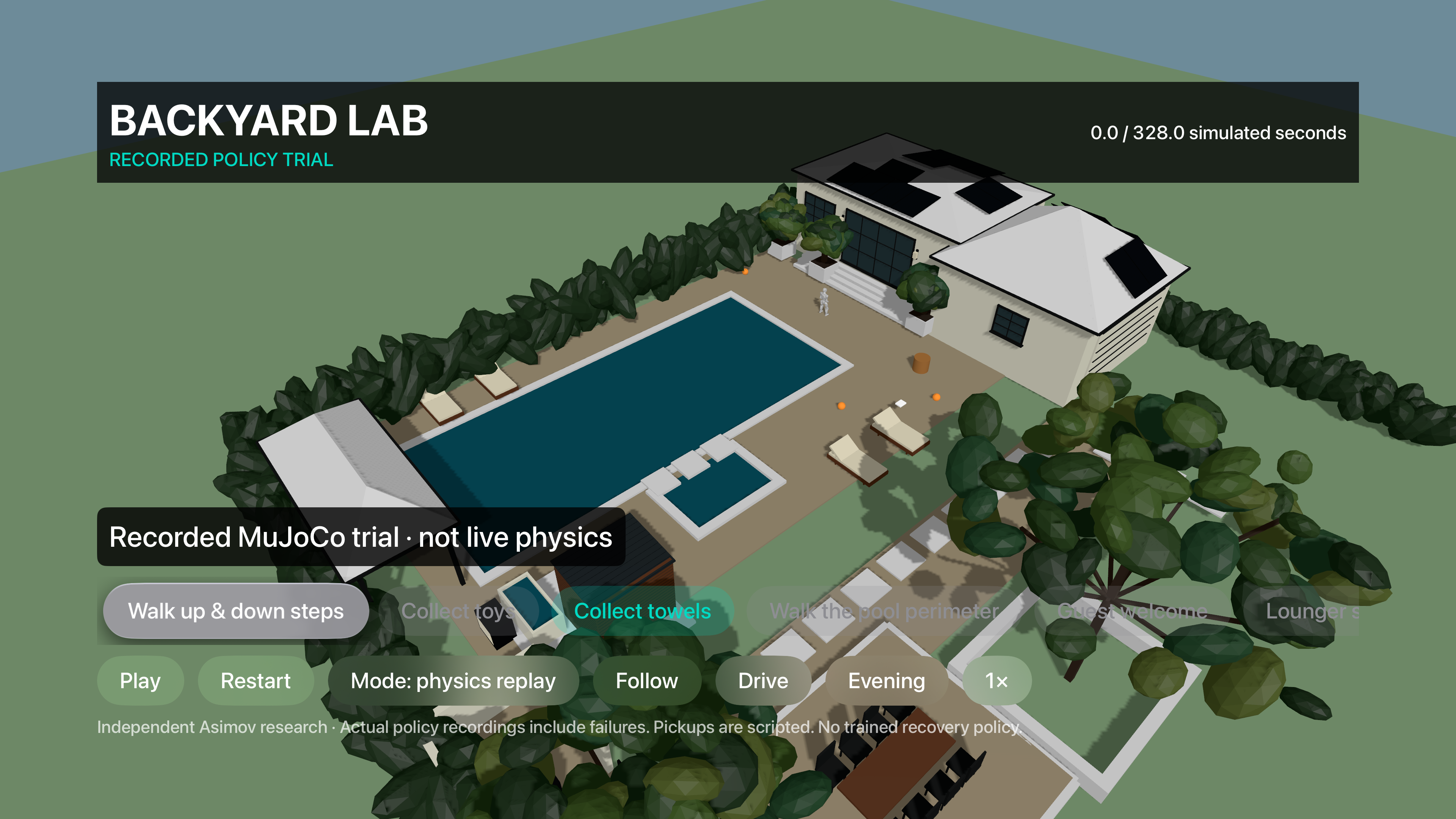
OBLIQUE RESEARCHROBOTICS PLAYGROUND · ASIMOV 1 BY MENLOComing soon Apple TV + Vision Pro
INTERACTIVE RESEARCH PROTOTYPE

Robotics Playground

Loading the scene… Choose an activity when it’s ready.

Asimov is simulated in MuJoCo; recovery can fail. Fleet tasks are scripted. Microducks use a separate shared physics scene.

Routines, settings & diagnostics

Built with Menlo’s Asimov 1, Menlo’s latest walking policy, OpenHorizon’s recovery policy, Ma-Dan’s legacy controller and MuJoCo. Meet the contributors ↗

Latest Menlo walking and OpenHorizon recovery. Latest walking uses 12 leg actions and holds the arms; recovery controls 23 joints. No robot connected.

Latest learned walking and automatic recovery in simulation. Use the onscreen controls or arrow keys.

↑↓ move · ←→ turn · Space pause · R reset

Single-robot routines

Use the motion mode above to compare scripted previews with experimental learned walking. Pickups stay scripted.

New service stops are timed prompts, not perception, conversation, or security checks.

Learned mode uses the latest policy in MuJoCo and may fail. Pickups stay scripted; these controllers are not validated stair-climbing or manipulation policies.

Legacy policy baseline · September 28

Guest welcome: completed in 202 simulated seconds.

Lounger rounds: completed in 387 simulated seconds.

Closing sweep: fell after 65 simulated seconds, before the first checkpoint.

One deterministic trial per route, real MuJoCo + legacy Ma-Dan policy, no external balance support. These results do not evaluate the new full-body or recovery policies. Completion means reaching the final waypoint—not validated real-world reliability.

Download all seven trial results ↓
What to build next

Forgotten-item finder: detect a toy, ask before moving it, then return it to a marked bin.

Movie-night runner: bring sealed drinks and popcorn to a designated pickup point.

Guest-ready reset: count towels, flag displaced loungers, and ask a human to resolve exceptions.

Future concepts require perception, manipulation, and human confirmation. The current tests cover locomotion and recovery, not learned manipulation.

Three robots. One operator.

Give each robot a task, then follow or drive one while the others continue.

Diagnostics · walking & recovery

Walking benchmarks

Joint torques + MuJoCo contacts, including movable toys and a solid basket. No balance support. The stair benchmark is experimental; these controllers are not validated for this staircase.

Fall & recovery

Choose a starting pose. A learned controller attempts to stand up; MuJoCo determines the motion and the result.

Uses the full-body model and OpenHorizon recovery policy. Initial poses are test fixtures; stand-up is not an animation or a reset. A failed attempt stays visible in the result.

Recovery source ↗
Physics controls & telemetry

Latest Menlo walking uses 12 leg actions and holds the upper body. OpenHorizon recovery controls 23 joints. Scene and motor settings are not hardware validated.

Policy provenance · Source ↗

Download MJCF · MuJoCo license

Select a physics mode or run a policy test.

View & scene

Run history & exports

Results from this session. Physics exports include commands, joints, contacts and torques.

  1. No completed runs yet.
Apple TV robotics demo previewBeyond the browserApple TV + Vision ProComing soon · See previews ↗

Fence closed · pool excluded · dimensions estimated

Live session data
LIVE SESSION
Loading
Position X / Z
—
Speed
—
Ground height
—
Heading
—
Render
—
Controller
Loading learned policies…
Camera
Clear view

Command log

    Loading Asimov…Learned walking + recovery · simulated robot
    Arrow keys / WASD · hold to drive
    ROBOTICS PLAYGROUND · UNDER THE HOOD

    How it works

    Hold the arrow buttons, arrow keys or WASD to drive a simulated Asimov. Its learned walking policy controls the joints; if it falls, a recovery policy attempts to stand it back up. Release the controls to stop. The SDK connection and repeatable tests are optional tools in Drive & test.

    Real software. Simulated robot.This diagram describes Drive & test with the SDK connected. Without that connection, driving uses our browser adapter. No physical robot, Asimov Edge firmware or Vision Pro hand tracking is connected.

    One command, one feedback loop

    Open full-size diagram ↗
    Keyboard or task agent sends movement to the browser command gateway. LiveKit carries commands and simulated state to the Python Menlo SDK and returns velocity commands. The walking policy drives MuJoCo physics. Physics feeds back to the policy, task agent, viewer and recorded results.
    The steps below follow this loop.
    1. You choose an actionDrive with keys or touch, or run a bounded task such as walking, turning and stopping.
    2. LiveKit carries the requestThe gateway limits speed. LiveKit sends the command to the Python service and carries the SDK reply back.
    3. The real SDK handles itMenlo’s Robot.set_velocity() runs against Oblique’s custom simulation transport. Its reply is not a hardware acknowledgement.
    4. Physics moves the robotThe latest browser walking policy turns the velocity target into joint actions. A detected fall switches to the recovery controller; driving resumes only after the robot stands. MuJoCo calculates motion, gravity and contacts.
    5. The loop checks the outcomeThe viewer shows that state. The task agent observes simulator ground truth, checks progress and records pass, fail or stop.

    What data moves?

    Movement messages are numbers, not video. LiveKit transports them; it does not run the walking policy, physics or task agent.

    StepDataPurpose
    Controls → gateway{vx, vy, vyaw}
    Forward / sideways speed in m/s; turning speed in rad/s.
    Request body velocity. This adapter allows ±0.2 m/s forward/back, no sideways motion, and ±0.15 rad/s turning.
    Gateway → SDK, via LiveKitReliable JSON: command ID, velocity and freshness nonce.Call the SDK with a bounded request. IDs and freshness checks reject stale replies or commands.
    SDK → gateway, via LiveKitReliable JSON: matching command ID, SDK sequence and returned velocity.Apply the returned target to the policy. The reply confirms the software path, not physical execution.
    Simulator → SDK, via LiveKitReliable JSON: sequence, simulation time, pose, orientation, joint positions/velocities, controller provenance and contact count (23 simulated joints for Asimov; the shared Microduck scene retains the legacy 12-leg-joint adapter).Feed simulated observations to the SDK. Samples are sent at up to 10 Hz in wall time; they are not real sensors.
    Policy ↔ MuJoCoObservation vectors → joint targets → controller torques; joint state feeds back. Latest Menlo walking uses 12 leg actions with the upper body held; recovery uses 23 actions. Each controller has its own observation layout.Runs locally in the browser at the latest controller’s simulation timestep and policy cadence. Reported simulation speed is not guaranteed real-time speed.
    Simulation → viewer & task agentPose, joint state, speed, simulation time and stop/fall status.Render the yard and robot-eye view; check task progress using ground truth, not camera perception.
    Session → JSON downloadCommands, SDK replies, sampled state, task result, limits and simulation provenance.Inspect failures as well as successes. Export buffers are bounded; dropped-record counts are included.
    See the wire format and connection setup

    The website server first issues a scoped session token. The browser joins the SDK room; server credentials stay out of the browser. The local preview uses mock owner sign-in. A public service still needs hosted infrastructure and production validation.

    SDK messages use LiveKit WebRTC data channels with UTF-8 JSON on oblique.sdk.input.v1 and oblique.sdk.output.v1. Hello, freshness challenges and session-end messages manage the connection. Stop or disconnect clears movement; this is an app safeguard, not a certified robot safety system.

    // Input (illustrative values)
    {"kind":"command","id":42,"velocity":{"vx":0.1,"vy":0,"vyaw":0},"nonce":"…"}
    // Output
    {"kind":"velocity","id":42,"sdkSequence":7,"velocity":{"vx":0.1,"vy":0,"vyaw":0},"source":"menlo-sdk","environment":"simulation"}

    Pose coordinates use metres; joint positions use radians and joint velocities use radians/second. The SDK orientation is a WXYZ quaternion. The rendered camera uses a separate Three.js frame with an XYZW quaternion — a future headset adapter needs explicit frame calibration.

    What does this actually prove?

    REAL SOFTWARE

    A testable command path

    Menlo’s Python SDK, LiveKit transport, the ONNX walking and recovery policies and MuJoCo dynamics run in the connected local demo. Commands, stops and outcomes are inspectable.

    SIMULATED WORLD

    Every robot observation

    Robot motion, contacts and FPV pixels come from the simulator. The yard is reconstructed from plans and photos; dimensions, collisions, masses and friction include estimates.

    SCRIPTED PREVIEWS

    Service routines and the fleet

    Towel/toy pickups, skimming and three-robot previews are animations and app rules. They do not demonstrate learned grasping, cloth/water physics or shared multi-robot dynamics.

    LIVE MICRODUCK EXPERIMENT

    10 ducks in Asimov’s physics world

    Pollen’s model and ONNX stand-up/walking policies share one MuJoCo model and state with Asimov, including robot-to-robot contact forces. Duck commands are local; Asimov retains its existing SDK/LiveKit route. Collision geometry is approximate, and recovery is not guaranteed.

    NOT CONNECTED YET

    Hardware and human capture

    No physical Asimov, Edge firmware, live robot camera or native AVP hand capture. The task agent is deterministic code, not an LLM or autonomous visual planner.

    The proof of concept is the full request → SDK → simulated motion → measured result loop. A completed software round trip is not proof that a physical robot can perform the task.

    Simulation details and the path toward hardware

    What you are actually seeing

    SOURCED ASSET

    The Asimov body

    Menlo’s public Asimov 1 meshes and joint definitions. A real robot design, displayed as an articulated visual model. Its appearance does not demonstrate motor performance or balance.

    Source model ↗
    RECONSTRUCTED / ESTIMATED

    The backyard

    Architectural model plus owner-authorized listing photos. Loungers, brick and fence are aligned by visual reference. Distances, clearances and surface properties are not surveyed or calibrated.

    Photos and source evidence ↗
    SCRIPTED MOTION

    Walking and stair climbing

    In Scenario preview mode, the app directly changes position and joint angles. In Assisted physics mode, the visible robot follows simulated joint and floating-base states under gravity and contact. Assisted mode tests externally assisted stepping, pose holding and disturbances; Learned physics runs the latest Menlo controller (legacy in the Microduck scene). Natural falls trigger a learned recovery attempt; diagnostic tests can also start from fixed fallen poses. No validated staircase or manipulation policy is included.

    SCRIPTED ATTACHMENT

    Towel collection

    Toys and towels attach to the wrist and are placed in the hamper by code. This does not test finger contact, grip force, slipping, fabric deformation or a learned manipulation skill.

    IMPLEMENTED APP RULE

    Fence and telemetry

    Scripted mode blocks commanded movement with boundary checks. Live MuJoCo uses a solid fence/gate collider and simplified obstacle boxes. Neither is a real robot safety system. Position and speed come from the selected mode: animation or simulation. Contact count and actuator effort appear only in live mode. None is measured on physical hardware.

    SEPARATE PHYSICS TESTS

    Recorded MuJoCo contacts

    The linked tests replay simulated gravity, friction and contacts for assisted fixtures. The towel is a rigid proxy; the tray loses its can; the foot probes fail to clear the stairs. None controls the Asimov on this page.

    Inspect physics tests ↗

    How this becomes a useful simulation harness

    A harness repeatedly resets the same task, runs a controller, records what happened and scores the result. We can keep this backyard, camera views and task controls and compare scripted intent against robot states produced by the live physics simulator.

    Measured scene + task→Robot controller ↔ physics→Recorded states + scores→This viewer

    PROPOSED NEXT STAGES · Live browser MuJoCo, robot-state rendering, disturbance tests and run exports are implemented. Latest Menlo walking and the shared-scene legacy controller plus automatic recovery and repeatable recovery tests are integrated for local evaluation. Calibrated hardware parameters, reliable stair climbing and broader task scoring remain unfinished.

    1. 1. Make the scene measurable

      Measure each step’s rise and tread, the door threshold, fence/gate line and narrow routes. Register scans to the existing model; give walls, furniture, pool edges and stairs collision geometry. Record uncertainty rather than treating every photo-derived dimension as exact.

    2. 2. Connect the actual simulated robot

      The articulated model runs in browser MuJoCo with source-model inertia and joint limits. Assisted physics uses simplified collisions and provisional 20 Nm motors; Learned physics uses its active, separately sourced model and actuator settings. Validate masses, actuator settings and contacts against the hardware. Both physics modes display simulator outputs. Menlo’s latest walking controller, OpenHorizon’s recovery controller and the legacy Ma-Dan controller have different observations and joint layouts; the adapter preserves those contracts and records the selected provenance. This does not connect to robot firmware.

    3. 3. Establish a flat-ground baseline

      Begin with standing, walking a short clear route, turning and stopping. Log joint states, actuator effort, foot contacts, body pose and controller commands. Flag any external stabilization or scripted assistance in every run.

    4. 4. Add steps and manipulation separately

      Test one measured step before the full staircase. Start manipulation with a rigid can or folded-towel proxy and genuine gripper contact. Add deformable cloth only after the contact and control pipeline works.

    5. 5. Repeat, perturb and compare

      Save the scene version, controller version, initial state, random seed and task settings. Repeat with varied friction, object positions, sensor noise and latency. Compare failures as well as successes; a single attractive replay is not validation.

    First benchmark: approach a towel station and stop

    Use flat ground on the pool side of the fence. This isolates locomotion before we combine stairs, grasping and cloth.

    • Record: completion rate, falls, contacts with obstacles, fence incursions, final position error and elapsed time.
    • Proposed pass criteria: reach within 20 cm of the target, settle below 0.05 m/s for two seconds, and finish with no fall or prohibited boundary crossing.
    • Report: all runs, assistance used and parameter ranges. Thresholds need agreement with Menlo. Current routine runs record progress, falls, stop reasons, elapsed time and delivered item counts; these do not yet enforce the proposed settling criteria. Export a run to inspect its evidence.

    The goal is to replace each scripted behavior with a measurable controller test—not to mistake a convincing animation for a robot capability.

    Built by Oblique Research LLC with Menlo’s Asimov 1 model and SDK, Menlo’s latest walking policy, OpenHorizon’s recovery policy, Ma-Dan’s legacy walking policy, MuJoCo, ONNX Runtime, LiveKit and Three.js. Independent research; not an official Menlo product or endorsement. Community credits & licenses ↗